Wednesday, March 29, 2017

A simple vision of a digital classroom

                                     1 A -  My Physical Classroom: Digital Mindset


My digital physical classroom is a physical space dedicated to both E-learning and traditional learning. Even though there is a contradiction between a virtual classroom and a physical classroom, I visualize an actual physical learning space that will include a digital space for students to connect to the outside world. One can argue that a student, from his assigned seat, with iPad, tablet, smart phone or a laptop can connect to anywhere in the world. It is true, however, my digital physical space will have desktops programmed with creative software that other devices don’t have. Therefore, I name my virtual classroom Spacecraft 2999.


A digital physical space dedicated to students in the classroom will give students the digital mindset to learn the 21stcentury skills, working on several, different platforms as well as learning the ethics of digital citizenship. My digital physical space will consists of several desktop equipped with VR tools. Students will work as groups in my space craft.  Students travel virtually to the outer space to search for concept that they learned in the classroom. Student will travel as groups and create an instructional communication around the learning topic. By changing the classroom environment, the mind is receptible to learning.


Secondly, my digital physical environment will include several station game types. It is a physical space for students to exercise their free time wisely. Students who finish their work little early can use their favorite play station. Whether it is an Xbox, DS or NES, the teacher can use it as a positive reinforcement tool or as a motivator for students to do their math work. In addition, play station often encourage teamwork. PlayStation -Edu teach students how to work with play station platforms, hardware and programming. My students will learn how to find solutions when stranded in their space ship. Accessing the development kit for PS2 and PSP will help students find solutions to Play station Hardware and Console for the game they love to play. The Space station corner classroom is an escape from math anxiety learning while learning problem solving skill, social skills.

The arrangement of desktops will take a circular shape. There will be a central desktop or the command center where a student who assume the leadership of his team will lead his team in various adventure manipulations. Students will have be assigned tasks related to the content studied in the designated grade level but tasks will take the shape of games to engage students with learning. Here, students mind set is transported to an adventurous learning area in a physical classroom.


In summary, It is important to dedicate a physical space for a digital classroom, it changes students mindset about learning. A student who moves from his assigned seat to another area of the classroom associated with games and play, attenuate the anxiety and stress of the many little obstacles that he confronts while learning new concepts. Finally, the teacher should take advantage of the classroom space to enhance his students learning in any way possible. 

Sunday, March 26, 2017

Cool Tool Mind Map

I have chosen the Map mind tool. It is a diagram that serves as a mind organizer of concepts and ideas. It is a traditional, hierarchical method to map complex things in the mind. It shows how sub-ideas are connected to the main concept. Students can use the digital mind map as means for note taking either in the classroom or at home to organize the learning targets of a lesson as well as the structure of the lessons taught in the targeted curriculum.


Students can use mindmap in the classroom as teacher present the lesson to the students. Students will note only the main points of the lesson. Mindmap will allow the students to see the connection between cincepts presented in the classroom in a real time. In other words, digital mindmap enhance the students comprehension in the classroom. Students write down the main topic idea in the central image. Concepts of lower hierarchy branch out in various twigs. Looking at the whole picture, students can have a mind pictorial view of how ideas are connected to each other.


Digital mindmap cool tool MindMeister provides the option of making several new  maps that are independent from each others. Students have the option to share the selected mindmap with their peers to compare their notes or share the mind map with the teacher who can rectify any misrepresentation in understanding the relation among concepts. Mindmap menu is versatil, coloring text, associate pictures and video to concepts. Students can create slides from the mind map to be organized according to their concepts priorities to understand the lesson.


As a prospective teacher, I will use the Mind map during lesson presentation to give students an overview idea of the lesson structure. Using Mind map, Students can point out to the concept that need to be mastered. I will note the mastery level for the classroom next to each concept of the content. Since Mind map could be accessed from several platform devices, it is a convenient tool to engage students and motivate them to connect to their learning. The teacher should integrate the way how to use Mind Map in the instruction, so the students will know how to benefit from its features. It will be integrated in the learning. The teachers have to chose methods to teach the use of mind map that is relevant to the objective of the lesson.  For example, the math teacher will present to his students that real numbers are presented as the main topic rational topic is the second lower level topic, followed by integers and natural numbers. The teacher will point out the menu tools to be used in Mind Maps to represent this hierarchy of number sets. I believe that the successful methods teachers use to integrate technology in instruction will have a positive impact on students learning.


Saturday, March 25, 2017

E-book in a Digital Classroom


                       Giving students a voice -Global Publishing through E-books.

Students who use e-books in the classroom will see a change in their writing process. Learning through e-books make education more personalized. Students are more subjective when writing about their learning subject. They tend to replace paragraphs with pictures or videos. This generation is influenced by the social media language. Nowadays, students try to break away from the academic writing style to a writing language that is free from any rules or guidelines. Students find E-books a good environment tool because they can express their imagination in different ways compared to a notebook and a pencil. E-books technology get students engaged in the writing process because learners have the opportunity to share their knowledge not only with their teachers and their classroom peer, but with the outside world; the community, society and they can reach out to students globally. As jon Smith mentioned in his audio “ The world is My Audience” E-books capture the students attention in learning. Jon Smith focuses on the multitude of listeners make writing interesting to the students. It gives value to the student effort in the classroom. E-books offer this opportunity to student to show their work to the world. Students can  also sell their book online as demonstrated in the article Using Book Creator to  support students with autism. Publishing their own books, students with learning disabilities find writing interesting. They created written material  published their e-book in a matter of three months. I will use this technology in my future digital classroom that will have a positive learning effects on my students.

As students write and create their own e-books and publish their work to the world, the teacher role is to guide his students to create a quality writing. Teachers see many benefits why e-books are a positive asset in classroom learning. E-books make the content more dynamic with animation and links to the concepts associated with the story telling. Students become rapidly immersed in the content. 

Teaching with Technology applications that are portable on mobile engage students for learning because the latters don't seem to separate themeselves from their smart phone even during classroom session. The article and video about Presentain provides the ins and outs of the software application used by ESL teacher in this case. Students will be able to see the teacher presentation on their mobile device and ask questions about the topic presented. The feature of this technology is the environment that create a discussion among peers. The digital classroom becomes student centered instead of teacher centered. The chart presented motivate students to enrich the discussion among them. 


Teachers-student relationship strengthen toward learning. Students ask their teachers guidance to create an e-book that they claim as their own. Teachers steer student away from the freestyle writing to academic writing by respecting the grammar rules and following the structure of telling the story to the world. Teachers integrate the e-book in the framework of TPACK to make instruction more meaningful to Students. The authors article E-books and TPACK depict e-books as an extension of traditional instruction. Classrooms equipped with e-books can only enhance the students reading and comprehension. Consequently, teachers should broaden their knowledge about this technology.

The topic video talked about  Jon Smith’s experience selecting the e-book technology, introducing it to his IEP students and integrating it in the instruction. The most remarkable thing is the legacy that the students left behind after they created their own E-books that can be viewed by the digital world. Most importantly, the teacher’s will to transform learning using a e-book technology.       

Saturday, March 18, 2017

Cool Tool Mathematica

Not all math learning software are free for learning purposes. I checked the copyright for math lab, The owner put many limitations for learners who seek to know about the material before purchasing it. However, Mathematica is a reliable software for learning math according to a cool tool testimony for a guide to math software. It allows users a free trial for 15 days. The teacher can purchase products according to his or her math teaching tools needed. Wolfram provides a webpage that displays the registered product either for teaching or personal use. Mathematica 11 focus on many areas in mathematics. Mathematica for education is suitable for use from elementary to graduate school. AYA Integrated Math teachers could select materials from Algebra, probability, statistics or geometry. 

Mathematica online provide first users a tutorial about the product features.Students can create notebook. The free form input is done through sections, subsections. I ca relate that to the programming structures such as procedures, routines and subroutines. It gives students an idea about hierarchy of programming. Calculation environment with Mathematica represent features such as approximation of decimal numbers, variable assignments, Students can create various functions according to the concept they are learning. A student can assign a function in the following format f[x_]:=  x + 5. The syntax of mathematica language is close to other languages such as C++. This software allow students not only to learn mathematics but a way to think logically as a programmer. A student can give the variable x= 1, the returned function will be f[1] = 6. More importantly, in mathematica, the function can return strings as well which is a good practical understanding of a function. f[*coin*] := coin + 5. 


Wolfram for educators provides many tools for math teachers. The image below represent various lesson plan that the math teacher could integrate to his or her teaching. Mathematica lesson plans are rich with dynamic concepts. For example geometry lesson plans bring geometry 3-d concepts to life. Teacher could communicate the ideas to his students using mathematica technology.


Wolfram for students offers course assistant applications targeting various common core standards concepts. Students can download Wolfram in their smart phones, tablets or use mathematica online using schools desktops. Therefore accessibility and usability are one of the advantages using mathematica tool. Students can describe


Students can also create animation using the cool tool mathematica. In this example a student create music scale and rythm program in mathematica.


So, where Mathematica fits in the TPACK framework. Wolfram educational portal is aligned with the the state standards. Mathematica for students present contents from elementary to high school in algebra, The article Seven Free Sources for Common Core Aligned content states that Wolfram  portal answers the content questions in real time. Students can learn content at either a self paced environment on the web. Student can also participate in group discussion in the classroom or using the Wolfram community groups . Teacher centered  learning where instructor shows dynamics math models to illustrate designated math concepts. The appropriate technology here is Mathematica 1. The technology used to explain math content to student in the form of  text; notebook features demonstrated in the tryout image above, Wolfram technology uses the multimedia documents as animation,sound and hyperlinks.
It important that the teacher know about the Wolfram alpha cool tool. The math teacher should be aware of various application using the software. As the video about wolfram alpha below states, the teacher should test the tool himself before start using it in the classroom. . Both teacher unique experience with the product as well as students shared experience will enhance the learning in the classroom.


Friday, March 17, 2017

Copyright and Fair Use

         
A math teacher often has to illustrate concepts using images. There are many math educational resources that have math images related concepts posted online. However, the access and the eligibility to use the material varies from one source to another. The digital math teacher is responsible for the way he or she uses the educational images to be integrated in the lesson plan.

Under fair use doctrine, the math teacher can use images with copyright following outlined guidelines In the classroom, part of the art work and graphic images  are allowed  to print only a limited number of copies for classroom use with restrictions on adding text to images. The copyright holder doesn't allow alterations to the selected image used in the classroom. Fair use guidelines remove some


restrictions that the copyright rules exercise on the designated images that the math teacher wants to use in the classroom. In the bottom image, the copyright holder has restriction on the use of the geometric images. The math teacher has to ask permission for the use of such material. the owner of the copyright who doesn't give permission for the use of such material tend to seek financial gain. Copy right and Fair Use for teachers shows to the prospective math  teacher how the doctrine can be used and the printed copies that can be made to avoid any violations of the rules.

On the other hand, before the math teacher downloads the selected math images from the web, he should inspect the Creative Commons that the owner had applied to the material of interest. If the creator had already given permission to his or her work, the math teacher is allowed to used the material. The video lists the different licenses that a creative comment image could have: Non commercial, Attribution, no derivative or share alike licences. It could be any combination of the previously mentioned licences.


Our responsibilities to be aware and to teach students that the material posted online are to be used according to the laws established for the digital world. Students and teachers are to read and understand the Creative Commons, Copyright and Fair Use doctrines. The math teacher should ask himself on what guidelines did I base my decision to use the material online in the classroom. According to Maureen T. Lerch, in his Copyright handout, The user should know the framework for analyzing the the copyright use. The article display a list of questions that students should ask themselves before attempting to use the material online.

The creator of images, text, video and audio should register his or her own work at the US. copyright office or use one of the search engines to find and register at creative common website according to the type of material created; images, text or video as shown in the video below. 
Teachers like to vary their ways of teaching, A math teacher who introduce a song about a math concept will get his or her students attention. However, there are Ethical issues around downloading music.The common infringement of  music downloads is practical nowadays. It is immoral to use the
music illegally. It is a violation of being an ethical digital citizen. Students or teachers who would like to use music for education purposes need to check the permission granted on the song or the video.
I would suggest that users should either go the the public domain where text, images video and musi download are free because their copy right are expired and the protection rules are not in effect anymore. Otherwise, digital citizens including teachers and students should respect the fair use, copyright and common core doctrine guidelines.
.
                 

Friday, March 10, 2017

Cool Tool for My Future Classroom

                                            Cool Tool Socrative   


 I would like to present a cool tool that I will use in my future classroom. I have chosen the Socrative technology learning tool. It is an application used in the classroom to facilitate learning, makes interaction between the teacher and his students much easier. Socrative is a learning environment that encourages instructive communication among peers. Socrative teacher allows the instructor to engage his students in learning concepts and makes it to assess student during the learning process by collecting data about the students understanding. Socrative Student makes learning enjoyable for students by using their smart phones in the classroom for education purposes.
Socrative application is compatible with other platforms in various various phones such as Androids, iphones, personal computers, ipads, tablets..etc. It works on chrome, internet explorer. It latest version is Socrative teacher or socrative student apk 4.4.1. Teachers can add images to the question which makes learning more visual and fun. 

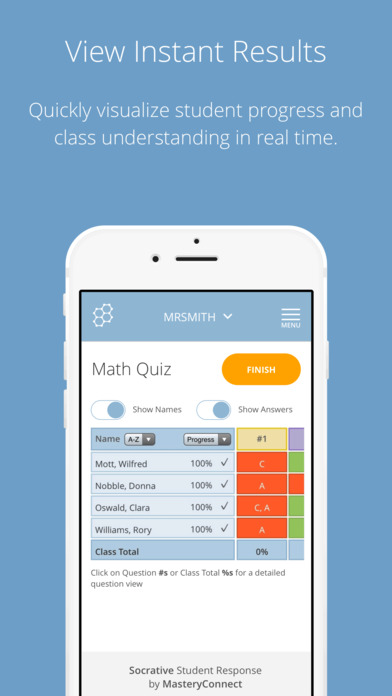
Socrative Teacher will allow me to start a quiz for my students, interact with students via the the new technology, turn math project into team games that promote collaboration via a game called space race.and students can give the teacher a feedback about their learning through exit ticket. Socrative teacher will give me an instant and more comprehensive  results about students quizzes and tests in the real-time. As a teacher, I can see the questions that my students didn't get right. It will allow me to reteach the learning targets where students didn't perform well.


While testing this fun learning tools, I found out that I can use differentiated learning in my future classroom. Socrative Pro allows me to create rooms where I can form several teams in the classroom according to their diverse abilities and assign various learning tasks according to their mastery of learning targets. In addition,  Socrative will make my classroom management organized. I will be able to use this technology to create an environment suitable for learning. 

  • Socrative is a student responsive system in the classroom that fits well in the TPACK framework.
  • Content Knowledge: Bell work, quizzes reflect the student's previous knowledge of Math concepts. Conversation in rooms about the concept of percentages. My students will be able to give real world situations about percentages. 
  • Pedagogy: My teaching style will adapt on how student learn from one classroom to another, Formative and summative assessment are ways of learning as well. Creating rooms for conversation between teacher and students or a guided peer to peer conversation about learning targets
  • Technology: Socrative  is a good resource that provide  good environment for interaction with learners and it's a good classroom management system.


This is a fun game provided in Socrative tool. The color represent students teams that compete among each other while learning. Teamwork and team spirit engage student in learning the math concepts.As students are engaged in solving math problems, the space Race is a measure on how well they are doing dealing with math concepts.  Learners associate the math learning targets to the space race. Math become a game to theme. Therefore, it is a fun subject to learn. 


                                                       Socrative in the classroom


www.socrative.com

Digital Citizenship


My Digital citizenship is about my responsibility as a citizen in a virtual world using various information technology tools. The norm of behaviors that I exhibit toward my fellows E-citizens in a digital society define my framework of digital citizenship. My digital participatory in a numerical society is based on a personal conviction of good behavior founded on mutual respect, and promoting safer digital environment for learning to everyone.

My digital access has become much easier and cheaper. I use internet constantly to stay abreast with my academics and my family overseas. Public libraries offer free limited hours for its patriots to use internet. One can find free Wi-Fi hot spots around town. Even though competition is tense among communication companies to attract more clients, I find my 5 GB for a reasonable price is not enough for me to stay connected to the digital world. I find myself obliged not to use high stream data applications such as you tube. As I travel overseas, the environment and location become a factor to stay a digital citizen. I had to purchase a new cell phone that conform to the regulation of the host country, visit cyber cafes more often and get use to the French system keyboards to stay connected to the digital world. In spite of the mentioned obstacles, In spite of the mentioned obstacles, I still consider myself having digital access to be a digital citizen      

A part from my experience on internet access, the article Teaching Digital Citizenship in the elementary classroom talked about digital access as the first of the nine elements of digital citizenship. The author stated that the opportunity should be granted to everyone to have access to internet. The article mentioned on digital access that Digital Citizenship is fundamental in development of society.    

My perspective of digital citizenship is based on respecting other digital citizens. My comments online are usually brief and to the point. I treat online users with mutual respect that promote progress in digital communication. As I further my education and widen my professional learning network, I become more participant in the digital world. Being aware of the visited online sites and their heir audience does affect the digital citizen. My feeling do not get hurt when reading aggressive comments by taking several precautions. Firstly, as a responsible digital citizen, I never respond to a harsh comment by the same. Avoiding digital communication conflict help the parties to not engrave the situation. As Dale Carnegie says in his book on how to influence people in one of his principals: “Show respect for other person's opinion. Never say you're wrong”. I believe it is a golden advice from one of the expert on how to deal with people. Even though his principals were meant to be used for communication in the real world, I think as a digital citizen, we should treat our digital audience as we meet them face to face. In addition,      


I like to read people’s reactions on issues that contribute to personal and professional growth. People react to issues in various ways in a digital society. As an adult who uses the information technology, I respect others opinions in the digital world. Even though
Sometimes, the expressed views are not in line with my opinion, I view it as an opportunity to exercise rational. As a responsible adult digital citizen, in the same article mentioned above Teaching Digital Citizenship in the elementary classroom, the author framed three of the nine elements of digital technology under Respect, Educate and Protect or REPs. These elements are digital access, digital etiquette and digital laws. Even though we have full access to internet and we laid out ground rules or laws for numerical world, we still have to treat others with respect to protect ourselves.

Having considered respecting digital citizens can only enhance the digital environment, it is also reasonable to look at confronting the fear of lurking dangers that could prevent digital citizens from being part of digital participatory culture. Mr. Garth Holman, in his video Fostering Digital Citizenship and Student Legacy shows how a person can leave his or her digital footprint accessible to other parties. The web, twitter, student record,..etc. All have been archived. This wealth of information as digital archive that is shared with others about people's activities online could raise concern on the danger of lurkers. Parents and teachers should make kids aware of what is on the web, how to use internet and how to leave positive digital footprint. Mr. Holman gave several examples on how his students use what they learn in class about being a digital citizen and how they apply it in their real life. For example, students search information about their parent digital footprint. A student shares what is on class with the other digital citizens. The parents and teachers should contradict the fear and concerns on what might represent lurker dangers by educating students to build a good digital footprint or a legacy that is positive for other people to see.